iKono Telecommunications

What is Docker and why should you start using it?

Loading

Docker

What is Docker?

As defined in its official website , Docker is "the world's leading software container platform," which aims to eliminate the "it only works on my machine" problem. Docker creates containers that hold the dependencies and requirements your application needs to run. Unlike other virtualization platforms such as Vagrant, Docker uses the concept of Linux Containers (LXC), which do not require a hypervisor and run directly on the kernel, resulting in less impact on the performance of the host machine.

The following diagram simply illustrates the most important components of the Docker Engine:

Arquitectura del Docker Engine

Engine

The Docker daemon runs as root and has a REST API that allows external connections. The Docker client manages the daemon through the REST API; if you run Docker, for example, from a cloud server (Amazon, Linode, etc.), you can access the REST API directly without having to go through the cloud server's console, although this requires strict SSL certificate configuration.

Docker objects:

When we use Docker, we create images, containers, manage them on networks, and assign volumes to them; these are the basic parts of the platform.

  • Images: These are read-only templates that describe a container. Images generally consist of a base and special modifications; for example, you can have a Python image and modify it by adding the libraries you need, or even have an image of a complete operating system like Ubuntu and have a whole LAMP environment for web development within it. Docker has a image bank predefined options where you can find official images or images modified by the community, so you don't have to reinvent the wheel.
  • ContainersThese are the instances of the images, that is, the running image. When we run a container, we can access it through the CLI and execute the necessary commands. For example, we can run an Ubuntu image, access it, and install Nginx to run a web server, or have a Python image and install packages using pip.
  • Grid: Docker uses a virtual interface to communicate with the host machine's network. In turn, the containers running can belong to one or more networks and communicate with each other as needed.
  • Volumes: They allow each container to have a private or shared space to store or access files on the host machine; it is also the way in which the information present in the containers is preserved after their execution is complete.

Why use Docker?

  • “Problem: It only works on my machine”As software developers, we sometimes need to install libraries, databases, packages, and many other additions for our projects to function. This makes teamwork somewhat cumbersome, resulting in lengthy installation and configuration guides, not to mention the unexpected problems we might encounter due to installation incompatibilities, broken packages, and so on. This is where Docker comes to the rescue, allowing us to create an image with all the requirements for our project in an isolated environment that won't interfere with what we already have installed.
  • PerformanceWhen you use virtual machines, you consume a large amount of machine resources to get them up and running, in addition to the time you have to wait for deployment. A Docker container launches in seconds and only consumes what it needs, while a virtual machine maintains control of a percentage of memory even when it's not using it.
  • Portability and accessibility: You can have your entire working environment in an image that you can upload to the Docker repository (DockerHub) to share it with your collaborators or with the entire community.
  • Easy DeployIf you create an image of your entire implementation, you simply need to download it and run it on your server.
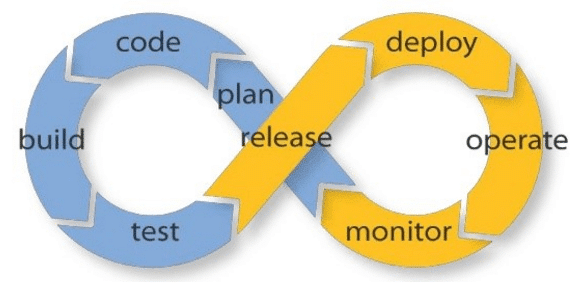
  • Agile: Facilitates the adoption of DevOps techniques such as circular life cycles.
  • ScalableIt is possible to replicate a container or have a swarm of containers (Docker Swarm); Docker even balances the load between containers.
Ciclo de vida circular

The above is only a  preview Of all the features and advantages Docker offers developers, the best thing about it is that it's free software, has a large community, the official documentation is straightforward and clear, and there are countless official images (Nginx, Ubuntu, Python, Node, Redis, MongoDB, MySQL) and modified images from users. The learning curve isn't very steep, but it's not a walk in the park either; it has quite a few options that can improve the performance of our containers and are worth exploring.

Image sources:
Docker engine: https://blog.appdynamics.com/engineering/devops-scares-me-part-4-dev-and-ops-collaborate-across-the-lifecycle/
Circular life cycle: https://blog.appdynamics.com/engineering/devops-scares-me-part-4-dev-and-ops-collaborate-across-the-lifecycle/

#We invite you to read our blog post «iKono at AstriCon 2017»»

Facebook
LinkedIn
WhatsApp
E-mail

Learn about our Corporate Solutions

Learn about the IP telephony, multi-agent chat, and mass text and voice messaging solutions for your business.

3 Responses

en_USEnglish